Juicebar
Windows battery monitor
A small Windows app that reads the battery of wireless mice, keyboards, headsets, earbuds and controllers and shows it inside the taskbar, next to the clock. Click it for a flyout with history and time left. Open source, and built on my own in 2026.
Get it on GitHub- Role
- Everything. Native widget, device protocols, UI, CI and releases
- Timeline
- 2026
- Stack
- Rust, Tauri 2, Svelte 5, TypeScript, Win32, Direct2D
- Code
- GitHub ↗
- Download
- Windows installer ↗
- Device families
- 10
- Installer
- 1.3 MB
- Memory at idle
- ~6 MB
- CPU at idle
- 0%
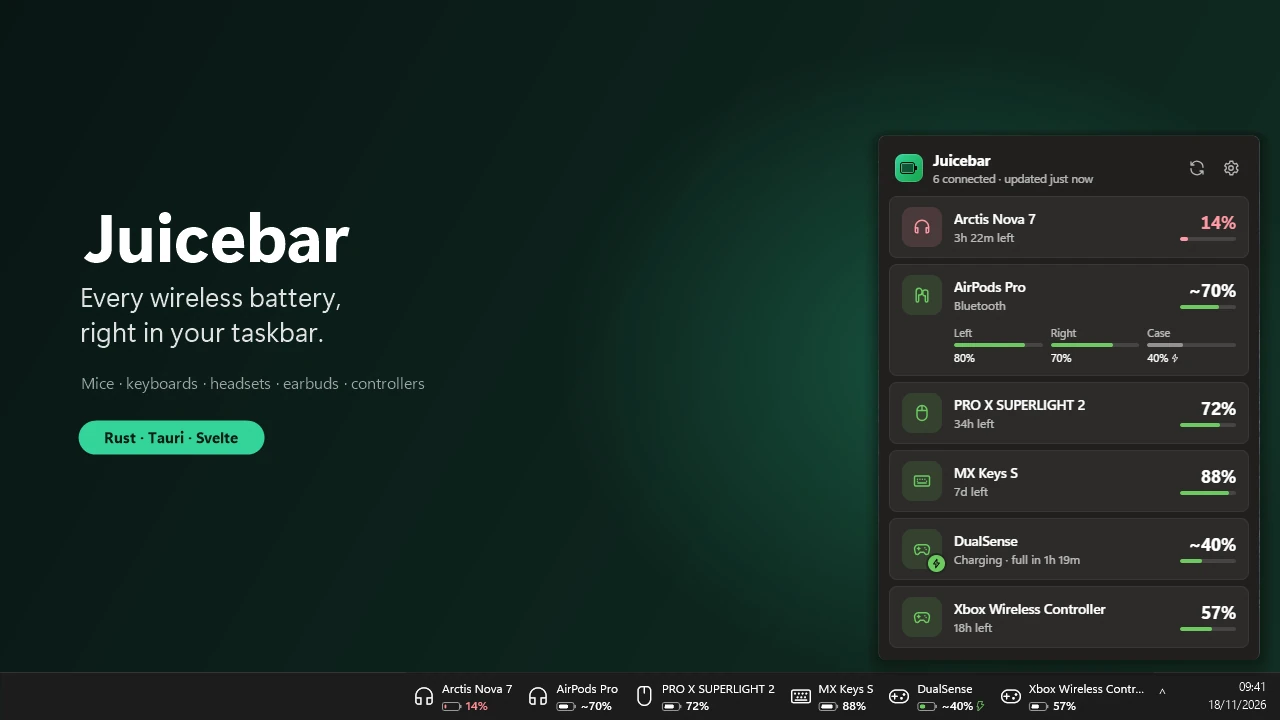
Every device in the taskbar, with the flyout open above it.
01Where you already look
Wireless gear dies at the worst moment, and Windows hides most battery levels three menus deep, if it shows them at all. Juicebar puts them in the taskbar: an icon, a name and a percentage for each device, two lines tall like the clock, or just the icon and number when space is tight.
It started as a rewrite of an existing open-source tray app. I wanted it lighter, better looking and able to read far more devices.
02Drawing inside the taskbar
Windows has no API for putting things in the taskbar, so the widget is a layered child window of the taskbar itself, drawn with Direct2D and DirectWrite into a bitmap with per-pixel transparency. Text is lined up on the glyphs' real ink rather than their boxes, so icons, names and numbers sit on the same lines as the clock.
It follows the light or dark taskbar and the display scaling, puts itself back if Explorer restarts, and falls back to a tray icon when it has nowhere to go. One detail cost a day: Windows only allows layered child windows for apps whose manifest says they support Windows 8 or later.
03Ten protocols, one model
Every brand reports battery differently. Juicebar has a reader per family: Logitech's HID++ 2.0, Razer's feature reports, the DualSense status byte, SONiX keyboard dongles, XInput, Windows Bluetooth with a direct GATT read, AirPods advertisements, a HID report-descriptor parser for anything that follows the standard, and HeadsetControl for the long tail of headsets.
They all produce the same reading type. Brand drivers claim their interfaces first so the generic reader never talks to them, and the same device seen twice, say over a receiver and over Bluetooth, is merged into one.
04A headset with no protocol
My own Logitech G435 doesn't speak Logitech's usual protocol at all. Its battery sits behind the dongle's radio chip, reached through a vendor bridge that has to be switched into a bootloader mode for every read, and that briefly mutes the headset.
Working from other people's reverse engineering, Juicebar reads it in about 200 ms, converts the cell voltage to a percentage, and only asks every ten minutes, showing the last value in between. How often is a setting, because half a second of silence is a real trade-off.
05Small on purpose
A battery monitor that eats memory defeats the point. The core is Rust, the widget is native Win32, and the Svelte flyout runs in a WebView that only exists while you need it: it is created on click and destroyed 45 seconds after it closes. Until then the app sits at about 6 MB of memory and no CPU, and the installer is 1.3 MB.
Readings are event-driven where possible. Plugging a receiver in triggers a scan straight away instead of waiting for the next poll, and sleeping devices keep their last level, dimmed, across restarts.
06Shipping it
GitHub Actions checks formatting, lints, runs the tests on Windows and builds the core on Linux on every push. Tagging a version builds the installer and the MSI and attaches them to a release. A demo mode with simulated devices and a day of made-up history keeps the screenshots reproducible and the UI easy to work on.